Billing & pricing
The plans, what a project costs, changing a plan, seats per namespace, the White Label add-on, and your billing installments.
Plans
Every project has a plan: it sets how many environments and instances the project may run, how many people the namespace includes, and which features the project gets.
You can
- Compare the plans' prices and limits in the table below.
- Pay monthly or annually: a year costs ten months, so two months are free.
- Change a project's plan from its Pricing & Plans (Change a plan).
- See how a project's price adds up in What a project costs.
Good to know
- Essential, Pro and Premium all include automated deployments, backup and restore automation, and advanced monitoring and alerts.
- Pro and Premium also come with priority support and copies of your backups on your own storage, and can add White Label as an add-on.
- Essential and Pro run one production app in a project; their other instances are for staging and development. Premium runs several production apps, which share the production environment's server. The table below has each plan's numbers. A project that needs more starts a further project.
- A project's environments show how many of the plan's apps each one uses.
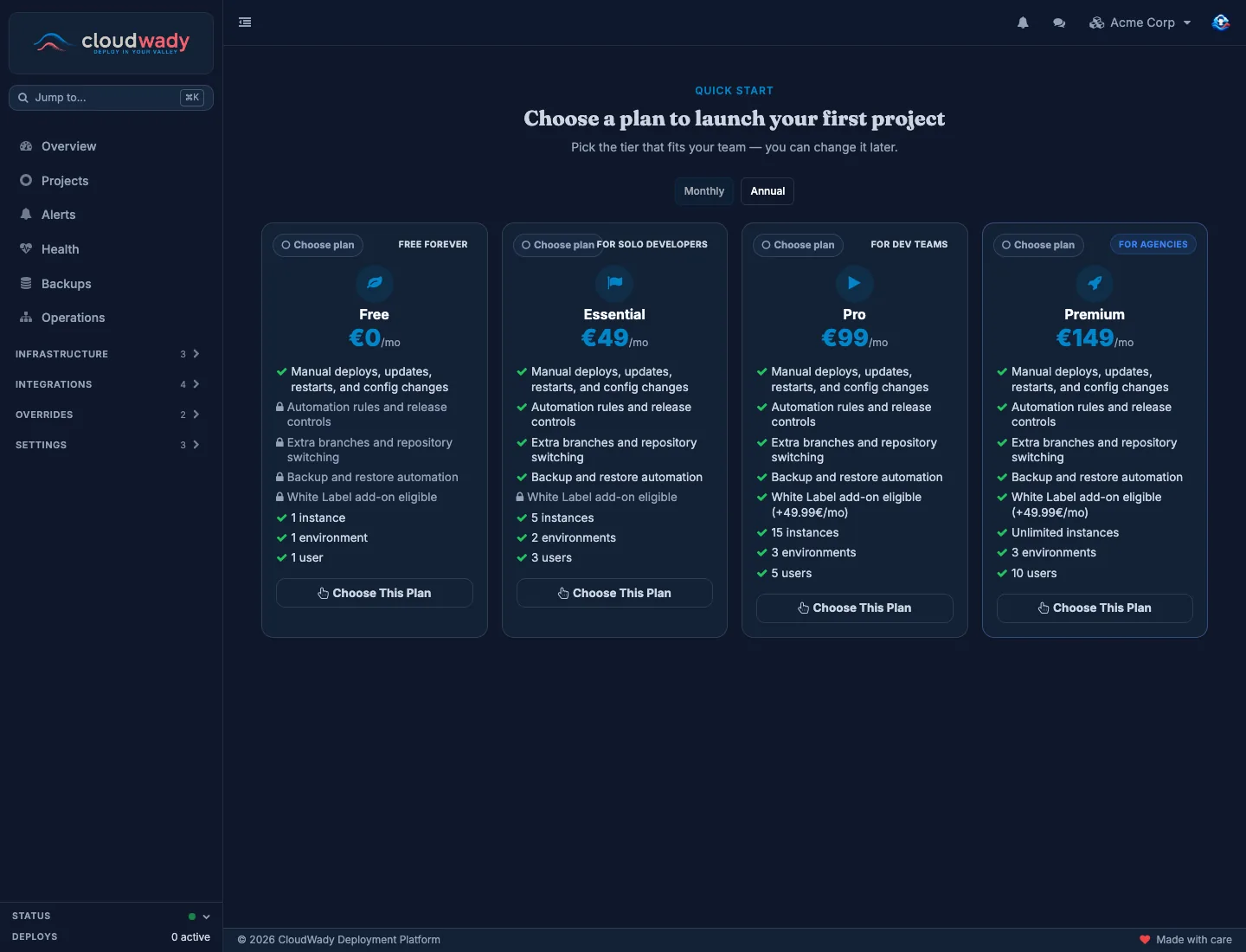
| Plan | Price | Users | Environments | Instances |
|---|---|---|---|---|
| Essential | €49 / month | 3 | 2 (production, staging) | 5 |
| Pro | €99 / month | 5 | 3 (production, staging, development) | 15 |
| Premium | €149 / month | 10 | 3 (production, staging, development) | 50 |
What a project costs
A plan's price has two parts:
- A project fee, for every project on that plan.
- A users fee, charged once per namespace, however many projects it has. The namespace pays the users fee of its highest plan.
| Plan | Project fee | Users fee | Together |
|---|---|---|---|
| Essential | €34 | €15 (3 users) | €49 |
| Pro | €74 | €25 (5 users) | €99 |
| Premium | €99 | €50 (10 users) | €149 |
So a second project on the same plan adds only its project fee. Add-ons, such as extra seats and White Label, come on top.
A project's plan
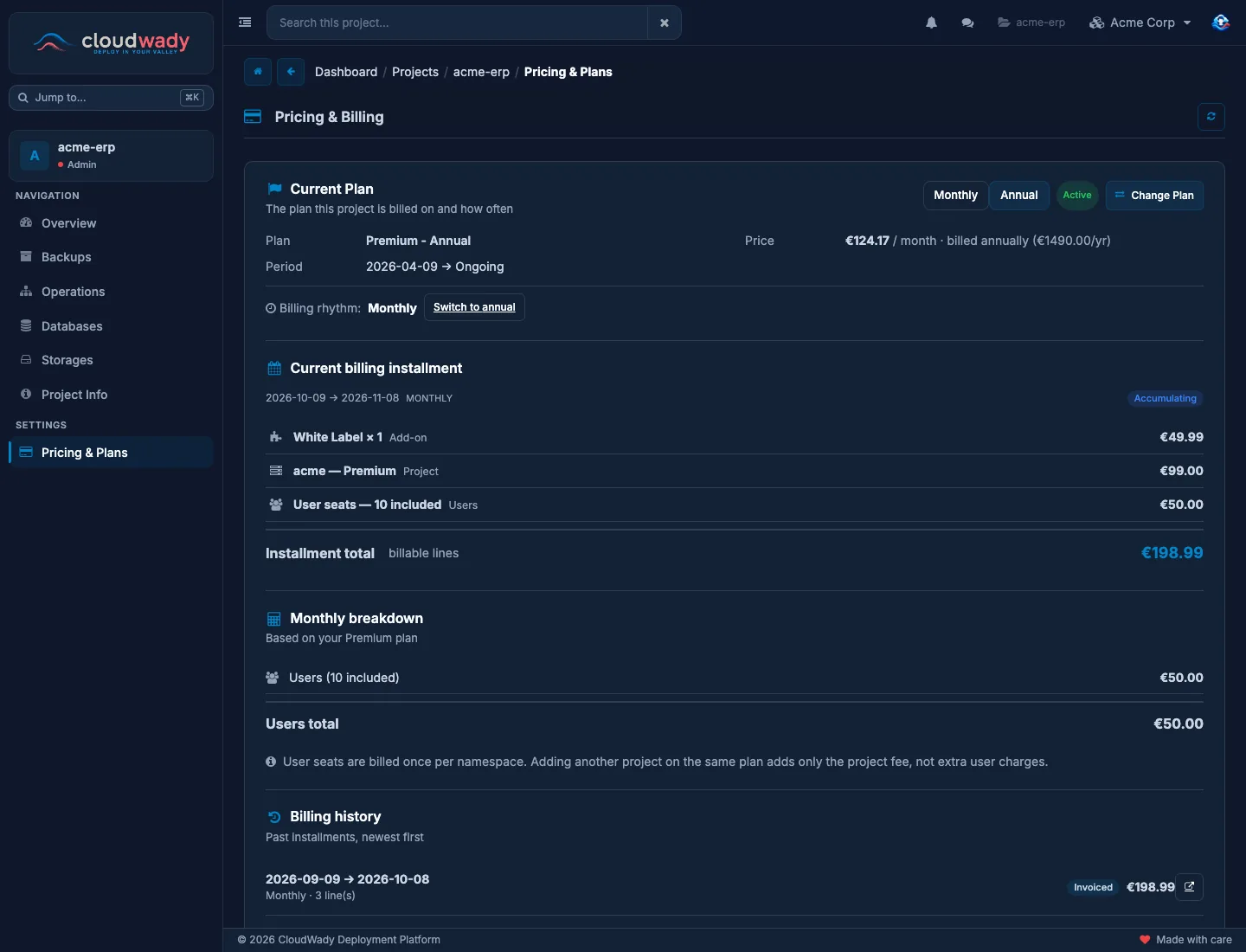
This project's plan, the installment it is billed on now, and what it was billed before.
You can
- Switch the billing rhythm between monthly and annual with its button.
- Move the project to another plan with Change Plan (Change a plan).
- Add White Label with its card, on a Pro or Premium project (White Label).
- Read each charge of the Current billing installment, and past installments under Billing history.
Good to know
- A new rhythm applies from the next installment, not the current one.
- The current installment has one line per charge: the project, the users and each add-on.
- This page is for Admins.
Change a plan
- On the project's Pricing & Plans, click Change Plan.
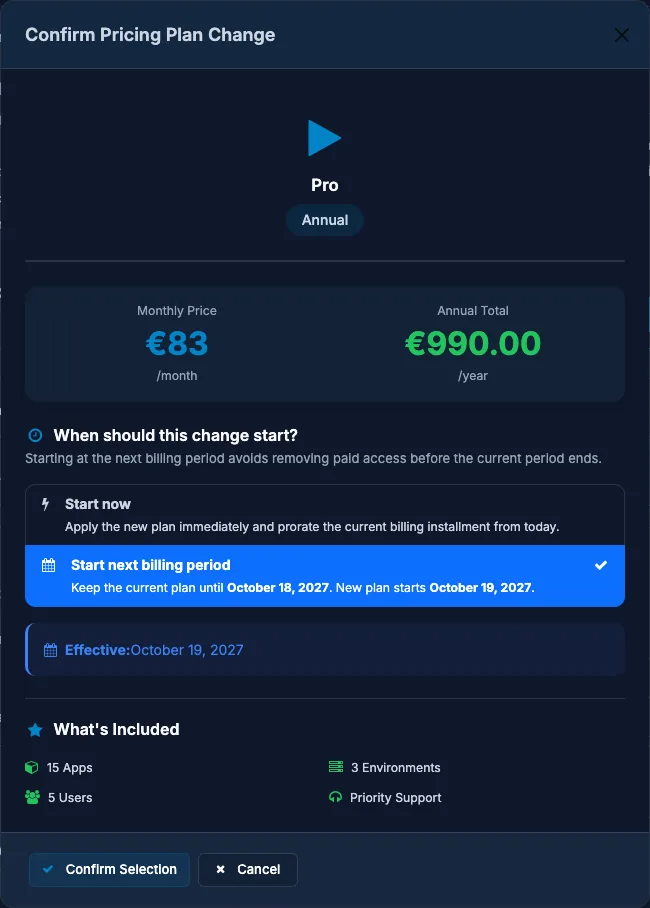
- Pick a plan card, monthly or annual, and click Confirm Change.
- Choose when the new plan starts:
- Start now applies it today. The current installment is prorated from today.
- Start next billing period keeps the current plan until its period ends; the dialog shows both dates.
- Click Confirm Selection.
Seats
Seats belong to the namespace. A namespace has as many seats as its highest plan includes, plus any extra seats you buy. Plans don't add up: a Pro project and an Essential project give five seats, not eight. A namespace with no project yet has one seat, so its founder can get in and pick a plan.
Every active member of the namespace uses one seat. Members who only inherit access from a parent namespace don't use a seat there. Team & Access shows each namespace's seats in use next to its name.
Extra seats
Seats you buy on top of what the namespace's highest plan includes, so more members can work in it.
You can
- Buy seats with Add seats, on the namespace's row in Team & Access or in the add-ons at the top of Billing & Plans.
- Change their number, or end the subscription, from the namespace's row in Team & Access.
Good to know
- Each seat costs €4.99 per month, on the monthly and the annual rhythm alike.
- New seats work at once. Their first charge comes on your next installment, not the current one.
- End them before that next installment starts, and they are never billed.
- End them later, and they stop at the end of the current installment, which is billed in full.
- While members still use those seats, the subscription keeps running and being billed until enough members are deactivated.
White Label
An add-on for the whole namespace: your own brand, your own DNS providers, the Overrides section, and client namespaces for agencies.
You can
- Add it in the add-ons at the top of Billing & Plans, or of a project's Pricing & Plans › Billing.
- Put your own title, colors, logo and favicon on the pages your customers see, with Configure Branding once it is active.
- Add your own DNS providers under Integrations › Domains: a project's apps then get their address under your domain, and CloudWady makes the DNS records.
- Keep each client of an agency in a client namespace.
Good to know
- It costs €49.99 per month, once per namespace.
- Linking a domain of your own to an app needs no add-on: every plan has Add Custom URL.
- It needs at least one Pro or Premium project in the namespace.
- It ends by itself when the namespace has no Pro or Premium project left.
- To end it otherwise, contact support.
Add-ons
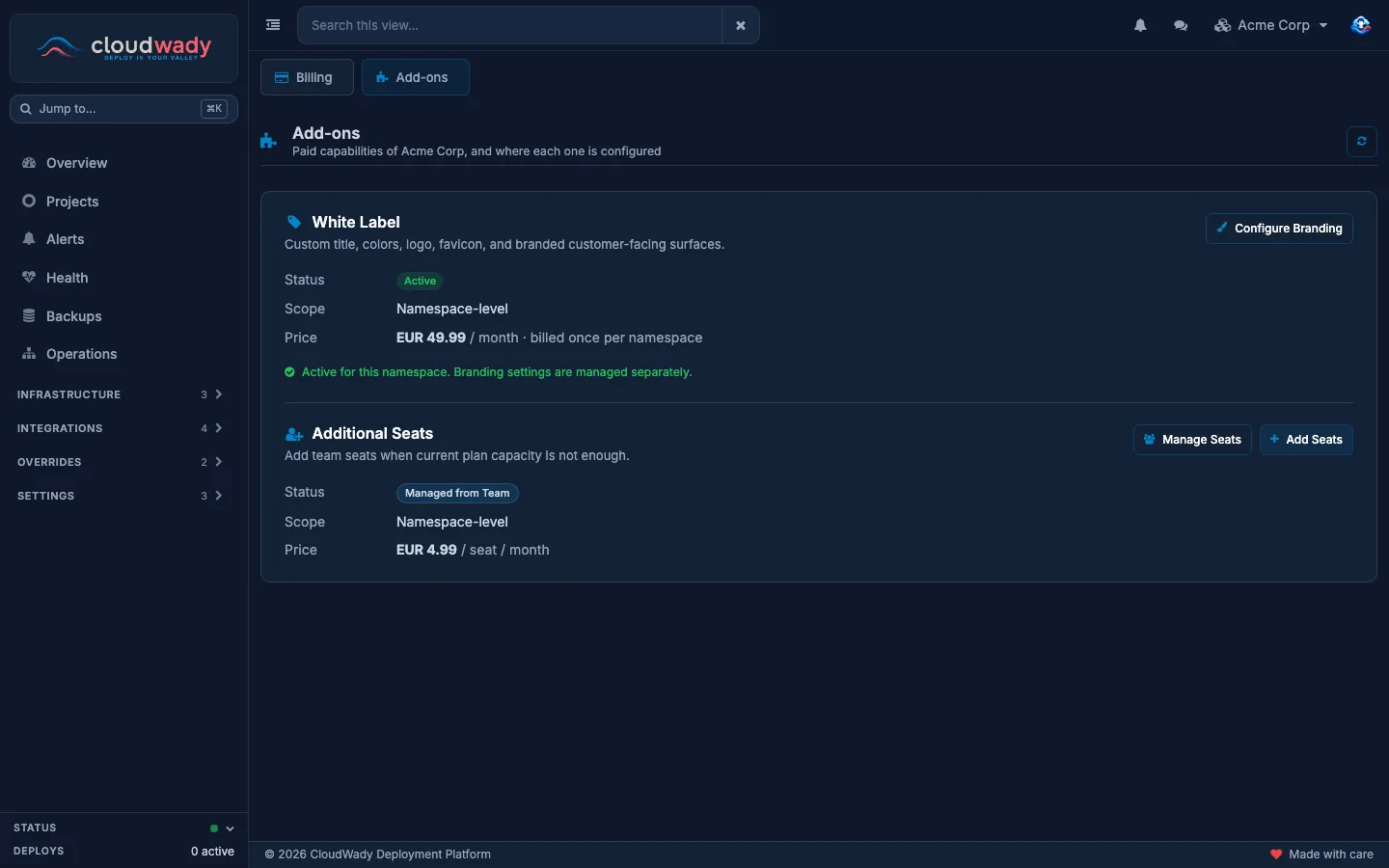
What the namespace you are working in can add on top of its plans: White Label and extra seats.
You can
- Turn White Label on with Enable Add-on: tick the box that confirms the monthly charge, then click Enable White Label.
- Set your brand with Configure Branding, which opens the namespace settings.
- When White Label says Requires Pro+, move a project to Pro or Premium with Upgrade Project (Change a plan).
- Buy seats with Add Seats (Extra seats).
- Change or end your seats with Manage Seats, which opens Team & Access.
Good to know
- Pick one namespace in the switcher first.
- White Label is offered once the namespace has a Pro or Premium project, and is active as soon as you confirm.
- Maintainers can look at this tab. Enabling an add-on and buying seats take the Admin role.
- What White Label adds is listed in White Label.
Billing installments
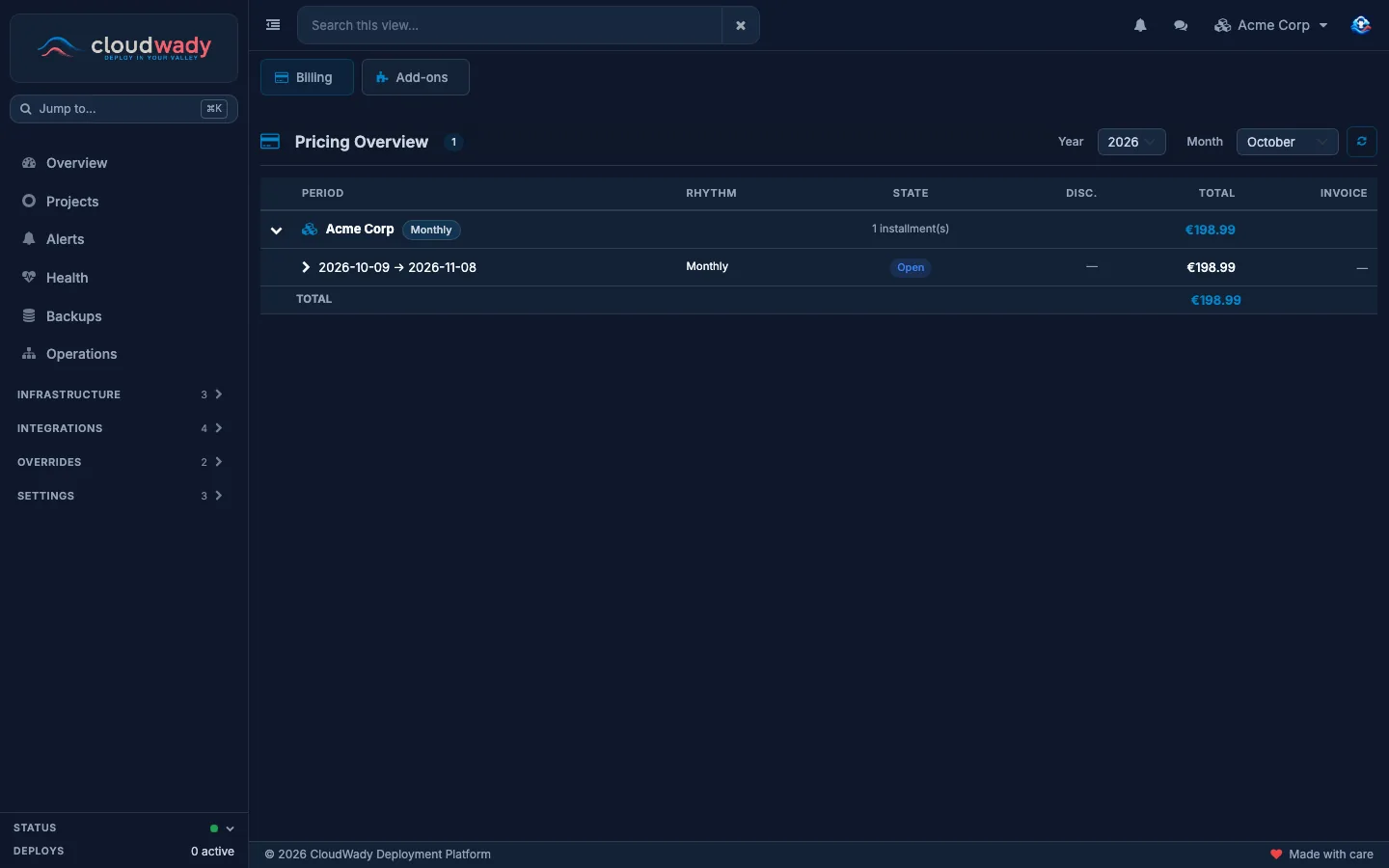
Your namespace is billed in installments, one per billing period, and this tab shows a month's installments, namespace by namespace.
You can
- Pick the month with Year and Month.
- Open a namespace to see each installment's period, rhythm, state, discount and total.
- Send questions about an invoice to support.
Good to know
- While its period runs, an installment adds up each project's fee, the users fee and your add-ons.
- Open is the current period, still taking charges. Locked means it ended and its lines are fixed, ready to invoice.
- Invoiced means the invoice was sent, and Paid that it was paid.
- Cancelled means nothing is billed for that installment.
- Invoices are addressed to your namespace, with the details you gave when you created it.
Was this page helpful?
Your answer helps us prioritize documentation improvements.
Thanks — your feedback helps us improve.
Type to search titles and text.
↑↓ to move ↵ to open Esc to close